Version 5.3.1 (CM) - June 29th 2026
5.3.1 is a release that strengthens how Weissr Capex handles financial data and gives administrators more control. Deleted requests can now be recovered, forecasts and actuals are tracked separately to support future reporting, and the Decisions tab is now mobile-friendly so you can review and act on requests on the go. The release also includes minor bugfixes
Weissr Capex Management
Separate actuals and forecasts
Groundwork for forecast history tracking
Capital projects evolve over time, and so do their forecasts. To support a future feature that will let you see how forecasts have changed throughout a project's lifetime, 5.3.1 introduces a structural change to how actuals and forecast data are stored internally.
There is nothing new to learn or configure. The way you work with requests stays exactly the same. This change lays the foundation for upcoming reporting capabilities that will give you a clearer picture of forecast accuracy and how estimates shifted from approval to completion.
As part of this change, you are now asked to confirm when changing the forecast start date of a project. Weissr treats the forecast start date exactly as before; the confirmation step simply makes sure the change is intentional, since it affects which periods are treated as actuals and which as forecasts. Previously the forecast start date could be changed without any confirmation.
💡 Coming soon: Forecast history tracking, which will let you compare how a project's forecast values evolved over time, is planned for a future release.
Restore deleted requests
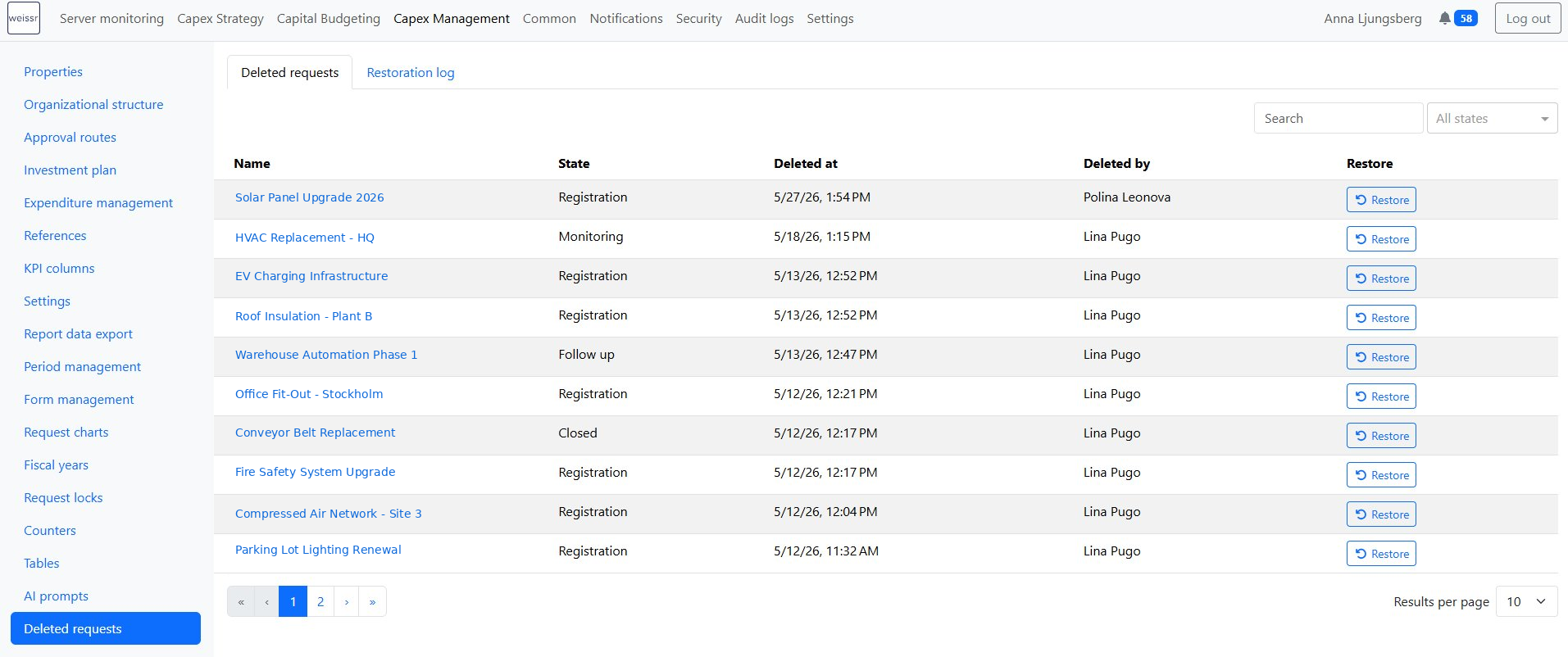
Accidentally deleted a request? Admins now have a dedicated list view in CM Administration that shows all soft-deleted requests and makes it easy to bring them back.
📍 What's new
Deleted requests list: A new view in CM Administration shows all soft-deleted requests with the request name, who deleted it, when, and which Project state category it was in at the time.
Filtering and search: Filter by Project state category or search by request name to find what you need quickly.
One-click restore: Select any deleted request and restore it to its previous state, including its data and workflow position.
Additional requests: When a main request is deleted, its additional requests are automatically deleted but hidden from the list. Restoring the main request shows a confirmation listing all affected additional requests and their state at deletion. Once the main request is restored, those additional requests reappear in the list and can be restored individually.
📌 Note: Only Superusers can access the deleted requests list, restore requests, and view the restore audit log.
Restrict deletion of externally mapped expenditures
Expenditure rows connected to an external system can now no longer be deleted through the UI. If the External mapping ID property is filled in on a row, the delete action is blocked, preventing accidental removal of rows that are actively receiving actuals from integrations.
Mobile-friendly Decisions
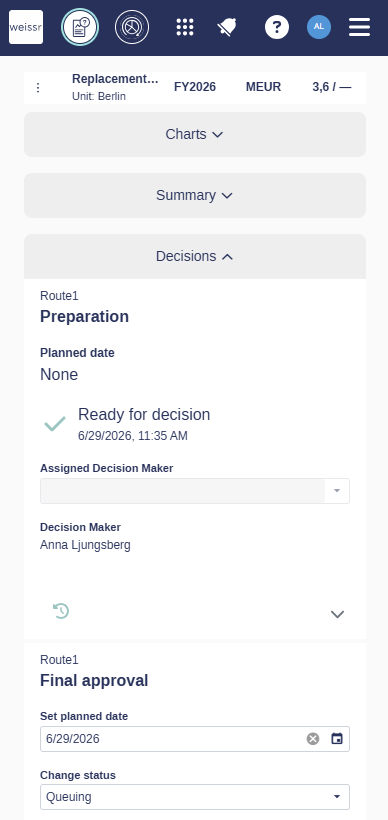
The Decisions section is now usable on phones and tablets. Previously, the route steps and the request header above them were laid out for wide screens, so on smaller devices the columns were cut into fragments that were hard to read and act on.
📍 What's new
Reflowed route steps: Each step in the Decisions section now displays as a full-width card with complete labels and touch-sized controls, so you can read and action a step without horizontal scrolling.
Readable request header: The header above the Decisions section reflows into a single compact row that keeps the request name, analysis start year, production unit, and requested amount readable on small screens.
Common
Connect Weissr Capex to AI assistants (MCP)
Weissr Capex can now be connected to AI assistants that support the Model Context Protocol (MCP). Once connected, the assistant can discover and use Weissr Capex tools to work with your data on your behalf.
This feature must be explicitly enabled by Weissr before it can be used. Contact Weissr to have MCP connectivity activated for your environment.
📍 What's new
Secure sign-in: Connecting uses the OAuth 2.0 authorization code flow with PKCE. You sign in on the Weissr side, and the assistant receives a token that represents your session, rather than handling your credentials directly.
Permission-aware access: The Weissr Capex MCP server is available as a remote HTTPS endpoint. Every request is validated and tied to your user session, so the assistant only ever sees the data your existing permissions allow.
📌 Current limitations: In this release, the connection supports retrieving data, and creating a request with the information required by Weissr Capex: request name, analysis start year, and production unit. Other fields are not editable through an AI assistant yet, and editing existing request data is not yet supported. Both are planned for a future release.
⚠️ Note: Responses are generated by the connected AI assistant, which processes your data to produce its answers. Results can contain errors, so always double-check them against Weissr Capex before relying on them for decisions.
Bug fixes
Capex Management
Grouped column headers in Power Mode now display more of the field name by default, and column widths are saved as expected.
Capital Budgeting
The budget status chart in budget backups uses the Production unit from the backed-up origin, not the current one.
Budget properties convert correctly to the user's currency when "Use local currency if possible" is enabled for requests outside a budget.
In the reporting data export, the
requestOriginIdincapital_budgeting_requestsmatches the value incapex_management_requests, enabling correct linking of requests in budget backups to their origin in Capex Management.Under certain conditions, saving budget data could fail because two operations tried to update the same record at the same time. This conflict no longer occurs.
Model Builder
The caption row in the referenced block popup is now fixed to the left when scrolling horizontally, keeping it visible at all times.
Common
Audit log entries for two-factor authentication now contain clearer, more useful detail.
Failed two-factor authentication attempts are now recorded in the audit log.
Disabling an external user no longer causes an error.