Version 5.3.3 (CM) - July 24th 2026
5.3.3 is a big step forward for visibility and control in Weissr Capex. The Capex Outlay Chart gets a complete makeover with monthly resolution and smart windowing, Capex Strategy gains a redesigned Sensitivity Summary report, and a brand new Notification Engine lets administrators configure notifications for user properties without code changes. The release also strengthens security with 2FA cooldowns and self-service SSO setup, and includes a large batch of bug fixes.
Weissr Capex Management
Capex Outlay Chart makeover
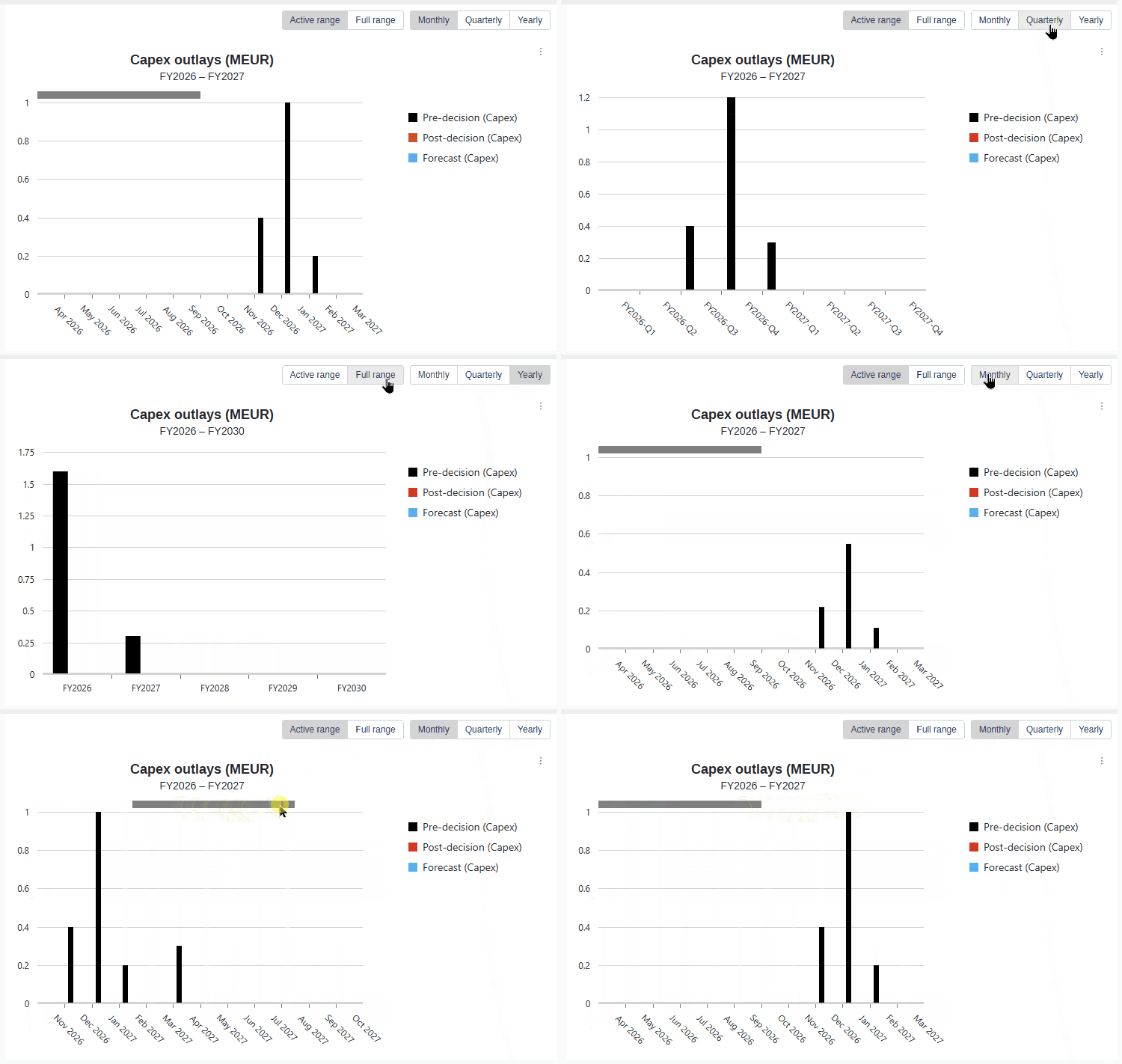
The Capex Outlay Chart used to show one bar per year across the request's entire analysis period, which could span 5 to 50 years. Yearly bars hid the monthly distribution that request responsible actually need: when invoices peak and how actuals track forecast month by month. In 5.3.3 the chart is rebuilt around monthly detail and a focused view.
📍 What's new
Monthly resolution by default: The chart now opens at monthly resolution, so you see the month-by-month outlay distribution immediately. Outlays were always stored monthly; now the chart shows them that way.
Resolution toggle: A control above the chart lets you switch between Monthly, Quarterly, and Yearly views with one click, so you can zoom out for a long project summary and back in for detail.
Active vs full period range: Instead of stretching across the full analysis period, the chart snaps to the fiscal years that actually contain outlays. A request with outlays only in FY2026 and FY2027 opens to those two years, with no rows of empty bars. One click expands the chart to the full analysis period so you can confirm nothing falls outside the trimmed view, and one click brings the smart window back. A sub-label below the chart title always shows the active fiscal year range, for example "FY2026 - FY2027".
12-period viewport with scrolling: The chart shows at most 12 periods on screen at once (12 months, 12 quarters, or 12 years). Longer ranges scroll horizontally, so bars stay readable instead of being squashed. The viewport opens anchored to the first period that carries an outlay.
Correct fiscal year handling: Monthly and quarterly bucketing respects the fiscal year settings from administration, including fiscal years that do not start in January.
📌 Note: The resolution selection is in-session only and is not saved between visits. The chart always opens at Monthly with the active range.
Never lose track of who approves next
Approving a step is easy to do in a hurry, and it is just as easy to move on without pointing out who should act next. The request then sits quietly on the following step with nobody watching it. Administrators can now make the suggested decision-maker a required field when approving, so a request never leaves a step without a clear next owner.
📍 What's new
Required per step: Administrators turn on Require suggested decision maker for any step in an approval route, so the setting follows your process instead of applying everywhere at once.
Enforced when moving forward: The confirmation pop-up asks for a decision-maker for the next step, and Confirm stays disabled until one is chosen.
Enforced when sending back: The same applies when a request is sent back, so the step it returns to also has a named owner waiting.
Only valid choices offered: The list is limited to users who can actually act on the target step, so there is no guessing.
Once a decision-maker is set, the right people find the request through their suggested decision-maker filters and, if notifications are enabled, get told that a step is waiting for them.
📌 Note: If a step has no possible decision-makers, the request can still be approved or sent back without selecting anyone. The setting is a guardrail, not a dead end.
👉 Learn how to require a suggested decision-maker on a route step
Expression properties calculate in the right order automatically
When an expression property refers to another property, the order the two are calculated in decides whether the result is right. Until now that order followed the alphabetical order of the property names, so administrators had to name properties in a way that forced the correct sequence. Where naming could not express the order, the dependent property showed a stale or empty value until some unrelated recalculation happened to run things in the right sequence. From 5.3.3, Weissr works out the order on its own.
📍 What's new
Dependencies decide the order, not names: Before calculating, Weissr reads each expression, works out which properties feed which, and calculates the inputs first. What you call your properties no longer affects the result.
Chains resolve in a single pass: A chain of dependent properties, for example C depends on B and B depends on A, resolves correctly the first time. No re-saving the request or making an unrelated change to get the value to appear.
Circular references are caught and reported: If two properties end up pointing at each other, you get a clear error instead of a stale value or a calculation that hangs.
💡 Info: Nothing needs to be reconfigured. Existing setups continue to produce correct values, including those where properties were deliberately named to control the order. If you have naming workarounds in place, such as prefixes that exist only to force a sequence, you are now free to rename those properties to something more descriptive.
📌 Note: This covers dependencies between expression properties on a request. Properties that take their value from an investment model are not part of this change.
Three new functions for property expressions: Switch, SafeDivide and IfEmpty
Some property expressions grow into long nested chains that are hard to read and easy to break. Three new functions each collapse a pattern that used to take several lines, so your expressions stay short and say what they mean.
📍 What's new
Switch: picks a result by matching one value against a list of keys, with a default at the end. Use it instead of a nested
IFchain that tests the same property over and over.SafeDivide: divides, and returns a fallback value you choose when the denominator is zero or empty. Use it instead of writing a zero and empty check around every division.
IfEmpty: returns a fallback when a value is empty, and the value itself otherwise. Use it instead of
IF(IsEmpty(x); fallback; x), which makes you write the same expression twice.
👉 Learn how to use Switch, SafeDivide and IfEmpty in property expressions
Common
Notification Engine: user property notifications
Until now, notifications in Weissr were hardwired to specific features. When an administrator assigned a person to a user property, for example a manual "Controller" on a Capex Management request or "Responsible for site" in Capex Strategy, that person was never told, and every "can we notify X when Y" request became a bespoke change or an external workaround.
5.3.3 introduces the first step of a fully separate Notification Engine, administered under a new "Notification configurations" section.
📍 What's new
Notification configurations: Create, edit, enable or disable, and delete configurations from a central administration section.
User property trigger: A configuration fires when a user is selected into a chosen user property, in either Capex Management or Capex Strategy, including system fields like Project Leader. The selected user is the recipient.
Friendly content editing with tokens: Compose the subject and body from static text and app-scoped tokens, inserted from a searchable menu and rendered as readable chips. No more hand-writing raw tag syntax.
In-app and email delivery: Choose the channels per configuration.
Send test to me: Try out a configuration on yourself before enabling it.
Smart delivery behavior: Duplicate notifications are suppressed, and dispatch waits for recalculation to complete so the notification content reflects the final data.
Project leader migration: The existing hardwired Project leader notification is migrated onto the new engine.
👉 Learn how to configure notifications in Administration → Notification configurations
2FA: progressive cooldown on invalid SMS codes
Previously a user could enter an unlimited number of invalid SMS verification codes during two-factor authentication, leaving accounts open to brute-force attempts. The 2FA step now applies the same progressive cooldown mechanics that already protect password entry, reusing the existing attempts setting.
Self-service SSO setup (OIDC)
Administrators and Superusers can now set up an OIDC single sign-on integration themselves, entering all the details related to the identity provider directly in administration, without involving Weissr technicians.
👉 Learn how to configure SSO providers yourself in Administration → Security
Bug fixes
This release includes fixes for issues introduced in version 5.3.1 or earlier.
Capex Management
Investment plan: "Restore defaults" no longer closes split screen mode.
Investment plan (CM and CB): the filter description in the exported Excel file now matches the description shown in the application.
Collaboration: comments no longer show a disabled user's id where a mention was used.
Projects with approval state Follow-up or Completed now correctly display the color formatting on the rows in the investment model.
Integration logs show the correct file details for scheduled actuals imports.
Actuals import: valid records are processed and skipped rows are logged even when the file contains several rows with errors.
Attached pictures can be closed on the Execution form.
Data transfer: the correct expense type is shown in transferred expenditures and no longer depends on the Useful life value.
Capital Budgeting
Remove requests popup: the Remove requests button is disabled until loading finishes, preventing a transaction deadlock.
Model Builder
After creating a block, the user is navigated to it and can see it in the block tree even if the machine's Sub industry/Capex Management section is collapsed.
Adding new rows repeatedly on a sheet with more than 9500 rows no longer causes a lock error that prevented changes from being applied.
AI Chatbot
The chatbot no longer returns expenditure property values it should not expose.
The link column is populated when only a list of requests is requested.
Clicking "Restart conversation" stops the ongoing answer and re-enables the input field immediately.
Request creation: the current year is used instead of a year taken from documentation.
Request creation: created requests are always persisted, so the returned link no longer leads to an error.
Request creation: production unit input is validated.
Request creation: full property names are used instead of shortened versions, for example "analysis start year" instead of "start year".
Filtering requests by an expenditure column value returns the request name, not the expenditure name.