Version 5.3.3 (CS) - July 24th 2026
Capex Strategy gains a redesigned Sensitivity Summary report, and a brand new Notification Engine lets administrators configure notifications for user properties without code changes. The release also strengthens security with 2FA cooldowns and self-service SSO setup, and includes a large batch of bug fixes.
Weissr Capex Strategy
Redesigned Sensitivity Summary report
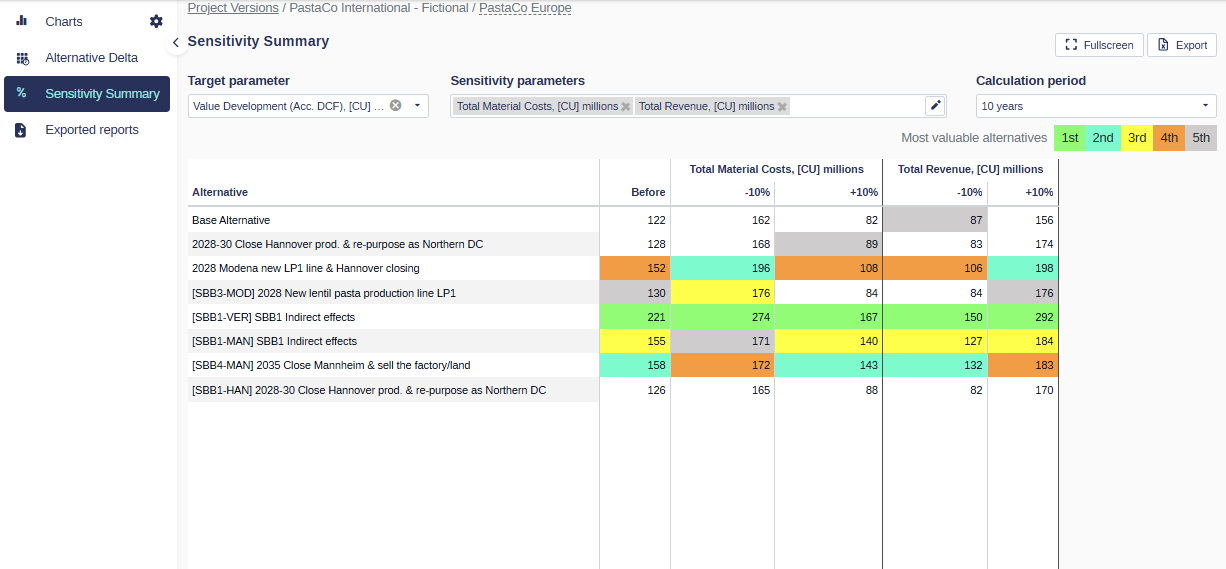
The Sensitivity Summary report has been rebuilt to be fully driven by your own parameters instead of hardcoded model rows.
📍 What's new
Configurable parameters: Select the target parameter used for comparison and ranking, and the sensitivity parameters (model rows) to vary, directly from the UI. Variation is fixed to plus or minus 10% for all selected parameters in this first version.
Calculation across all active alternatives: The report applies the variation to each selected sensitivity parameter and calculates the resulting target values for all active alternatives, presented in a structured table that clearly shows the target parameter and applied inputs.
Ranking and highlighting: For each result column, alternatives are ranked by value and the top 5 are highlighted with the default ranking colors, with a legend shown in the report. Alternatives with the same value share the same rank color.
Export: Export the report exactly as you see it, including the configured parameters, all displayed alternatives, column structure, and ranking highlights.
Improved table usability: Better horizontal and vertical navigation, key columns and headers stay visible while scrolling, and column sizing is consistent.
👉 Learn how to use the new sensitivity summary
Bulk delete alternatives
Cleaning up alternatives one by one is tedious. You can now select multiple alternatives and delete them in one action.
Common
Notification Engine: user property notifications
Until now, notifications in Weissr were hardwired to specific features. When an administrator assigned a person to a user property, for example a manual "Controller" on a Capex Management request or "Responsible for site" in Capex Strategy, that person was never told, and every "can we notify X when Y" request became a bespoke change or an external workaround.
5.3.3 introduces the first step of a fully separate Notification Engine, administered under a new "Notification configurations" section.
📍 What's new
Notification configurations: Create, edit, enable or disable, and delete configurations from a central administration section.
User property trigger: A configuration fires when a user is selected into a chosen user property, in either Capex Management or Capex Strategy, including system fields like Project Leader. The selected user is the recipient.
Friendly content editing with tokens: Compose the subject and body from static text and app-scoped tokens, inserted from a searchable menu and rendered as readable chips. No more hand-writing raw tag syntax.
In-app and email delivery: Choose the channels per configuration.
Send test to me: Try out a configuration on yourself before enabling it.
Smart delivery behavior: Duplicate notifications are suppressed, and dispatch waits for recalculation to complete so the notification content reflects the final data.
Project leader migration: The existing hardwired Project leader notification is migrated onto the new engine.
👉 Learn how to configure notifications in Administration → Notification configurations
2FA: progressive cooldown on invalid SMS codes
Previously a user could enter an unlimited number of invalid SMS verification codes during two-factor authentication, leaving accounts open to brute-force attempts. The 2FA step now applies the same progressive cooldown mechanics that already protect password entry, reusing the existing attempts setting.
Self-service SSO setup (OIDC)
Administrators and Superusers can now set up an OIDC single sign-on integration themselves, entering all the details related to the identity provider directly in administration, without involving Weissr technicians.
👉 Learn how to configure SSO providers yourself in Administration → Security
Bug fixes
This release includes fixes for issues introduced in version 5.3.1 or earlier.
Capex Strategy
Users with Model READ permissions now see the row colors formatting in the cash flow model.
Cash flow sheet stays on the selected Machine instead of scrolling to top when navigating to another alternative.
Cash flow sheet no longer loads twice when switching between Site SBBs.
Cash flow column resizing is kept when navigating to another node or alternative or when entering a value.
"Link to base alternative" is recalculated immediately for new model rows in an SBB.
Refreshing or opening the alternative delta report in parallel no longer leaves an unfinished async task blocking the queue and hanging the system.
Order of alternatives in the Sensitivity Summary of a new Division is correct.
Asset data for import / Asset mapping with outlays exports the Site reference correctly.
Using TAB for asset updating behaves consistently.
Second update in an SBB linked to an SA updates the model health property.
Model Builder
After creating a block, the user is navigated to it and can see it in the block tree even if the machine's Sub industry/Capex Management section is collapsed.
Adding new rows repeatedly on a sheet with more than 9500 rows no longer causes a lock error that prevented changes from being applied.