Version 5.3.5 (CS) - September 14th 2026
Capex Strategy gets a rebuilt alternative and site selection in the chart and report edit dialogs, which is a real relief on projects carrying a hundred alternatives. Pasting a single row into a taller selection in the Cash Flow Model now works the way you would expect. SCIM user provisioning moves into the application, and the release includes a batch of bug fixes.
Weissr Capex Strategy
Redesigned alternative and site selection in chart and report edit dialogs
Configuring a comparison meant working down a flat, ungrouped list of alternatives with toggle switches. On a large capital strategy project carrying 50, 100 or more alternatives there was no way to see at a glance what was included, no search, and no count anywhere, so auditing an existing chart configuration meant scrolling the entire list. The Site comparison tab was harder still, because site selections were only visible inside each alternative's expanded section. Chart comparison is the analytical core of Capex Strategy, so that friction went straight into the quality of the output. Both selection tabs have been rebuilt.
📍 What's new
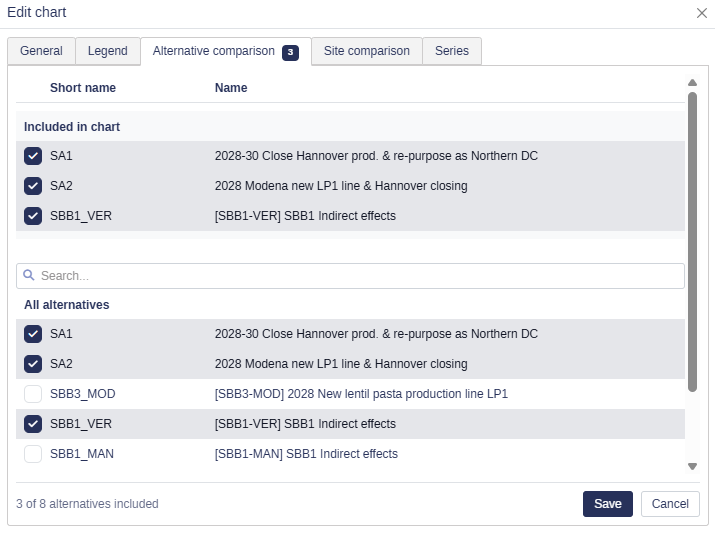
Two lists instead of one: A tinted Included in chart list at the top mirrors your current selection, and an All alternatives list below always shows every alternative. Included rows stay visible and ticked in the list below rather than vanishing from it.
Search: A search field between the two lists filters the all-alternatives list, so finding one alternative among a hundred takes a moment.
Checkboxes and a header row: Toggles become checkboxes, and a header row above the lists labels the short name and name columns.
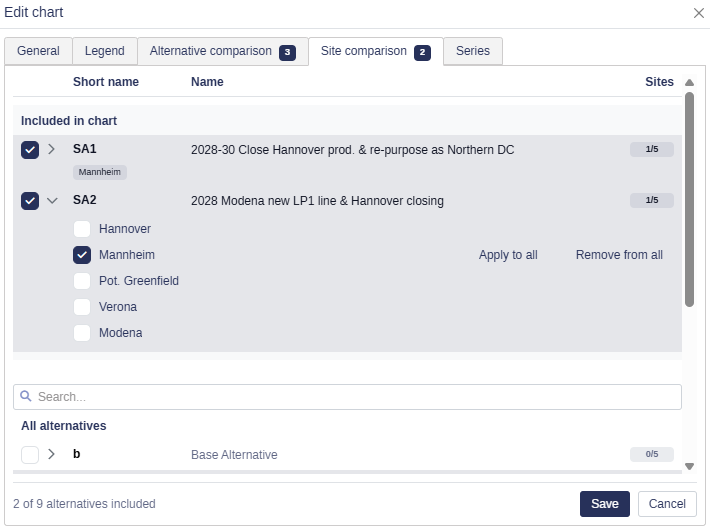
Site comparison brought into line: You can choose which alternatives to include directly on the Site comparison tab, and the selection you made on the Alternative comparison tab carries over, so you do not build it twice.
A count on the tab: The Site comparison tab badge counts the chart curves your selection produces.
Wider dialogs: The chart and report edit dialogs are wider, so full alternative names fit instead of being cut off.
Unsaved drafts are protected: Leaving the dialog with an unsaved comparison draft now asks you to confirm before it is discarded.
👉 Learn how to configure a chart comparison
👉 Learn how to configure a report comparison
Pasting a single row into a multi-row selection in the Cash Flow Model
Copying a single row in the Cash Flow Model and pasting it into a selection several rows deep used to fail with an error and paste nothing at all. That combination now fills the selection.
📍 What's new
A single row pastes down every row: Copy one row, paste it into a multi-row selection, and that row repeats through the selection.
Works with a layout applied: The same holds when a Cash Flow Model layout hides rows, where a paste could previously fail or reach past the selection.
📌 Note: A copied range more than one row high still fills only the rows it covers and does not repeat down a taller selection. Marking a single cell pastes the copied range from that cell, as before.
Common
SCIM setup moves into the application
Connecting your identity provider's user provisioning to Weissr used to mean a manual setup on the server with a Weissr technician involved. From 5.3.5 an administrator does it in the product, on the same Administration → Security → SSO configuration tab where SSO providers are already managed, so provisioning and authentication are configured in one place against the same Registration ID.
📍 What's new
SCIM configured from the interface: SCIM is enabled and configured directly in Administration, with no backend configuration and no Weissr technician needed.
Attached to an existing SSO provider: You choose which of your configured providers owns user management over SCIM. The link is stored against that provider's Registration ID, matching the way external users are already resolved.
Service user registered for you: Weissr can create the dedicated SCIM service user as part of the setup and give it the permissions SCIM needs, instead of one being created and wired up by hand.
📌 Note: The SCIM options appear on the tab only once SCIM is switched on in your installation's configuration. That is a server-side setting, so ask your Weissr contact if you do not see them.
👉 Learn how to configure SSO and SCIM in Administration → Security
Bug fixes
This release includes fixes for issues in version 5.3.3 or earlier.
Capex Strategy
A model block no longer stays permanently "in use" after its last scope tree usage is deleted, which blocked deletion indefinitely.
The Alternative overview no longer freezes when a collapsed section is expanded again on large lists.
Administration
The tooltip for the first column and row in the permission matrix is no longer covered by other elements.
Saving a currency with a very long description no longer causes an unhandled error.
The user group audit log no longer contains duplicated assignment and unassignment records after a user group assignment import.
Common and platform
A missing FX rate is no longer cached indefinitely, which caused conversions to fall back silently to a rate of 1.0.