Notification configurations
The notification engine is a centralized way to configure notifications in Weissr Capex. Instead of a fixed list of notification types wired into individual features, an administrator creates a notification configuration that binds three things together: a trigger (the event that fires the notification), a recipient (who is told), and the content (what they are told). Introduced in version 5.3.3, the engine supports one trigger to begin with: a user is selected into a user property. It runs alongside the existing notification types rather than replacing them.
💡 Info: The engine is designed so that new triggers can be added as configuration options rather than as new notification code. This page describes what is available in 5.3.3.
What is a notification configuration?
A notification configuration is the unit an administrator creates and manages in the admin area. Each configuration holds the following.
Element | What it holds in 5.3.3 |
|---|---|
Application | Capex Management or Capex Strategy. Chosen first, because it scopes both the property list and the available content tags. Cannot be changed after the configuration is created. |
Trigger | A user is selected into the chosen user property. Both custom user properties and system user fields (such as Project leader) can be selected. |
Recipient | The selected user, and only that user. This is fixed and is not a configurable field. |
Content | A body, and optionally a subject, built from static text plus tags that resolve against live data. |
Channels | In-app, email, or both. At least one channel is required. |
Enabled state | Enabled or disabled. A disabled configuration fires nothing. |
📌 Note: There are no conditions on the trigger in 5.3.3. A configuration is either enabled or disabled. Filtering by route, step, status, or property value is not available.
How does the engine differ from the existing notification types?
Both systems are active in parallel. The differences matter when you are deciding where to configure something, or when you are investigating why a user received a message.
Aspect | Notification types (legacy) | Notification engine |
|---|---|---|
Where it is configured | Admin → Notifications → Notification Types | Admin → Notifications → Notification configurations |
What exists | A fixed list of types, each tied to a feature | Configurations you create, as many as you need |
Content authoring | Hand-written | The same |
Recipients | Default recipients plus a confirmation popup on some types | The selected user only |
Timing | Sent as part of the triggering action | Queued, then sent after the change commits and recalculations finish |
History | Sent notifications and sent mail, retained indefinitely | Engine archive, purged after a retention period |
👉 Learn more about managing the legacy notification types
How to create a notification configuration
Navigate to: Admin → Notifications → Notification configurations.
Click to create a new configuration.
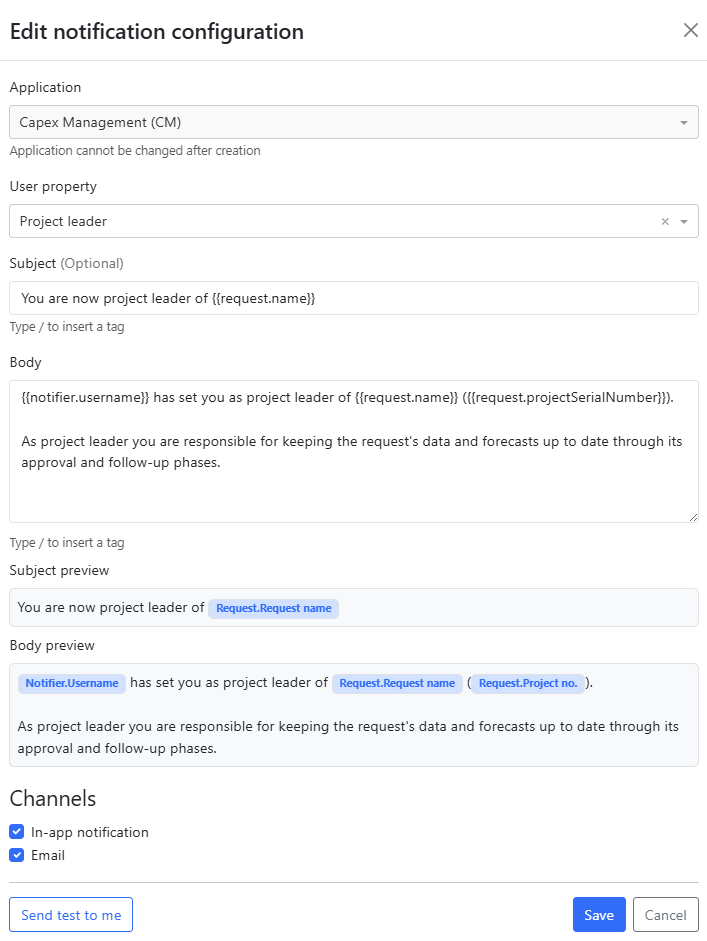
Select the application: Capex Management or Capex Strategy. This scopes everything that follows, so it comes first.
Select the user property that should trigger the notification. The picker offers custom user properties and system user fields for the chosen application only.
Write the body, and a subject if you want one. The subject is optional. Type
/in either field to insert a tag, and check the previews underneath.Select the channels: in-app, email, or both. At least one is required.
Click Send test to me to check how the message renders.
Save, then enable the configuration when you are ready for it to fire.
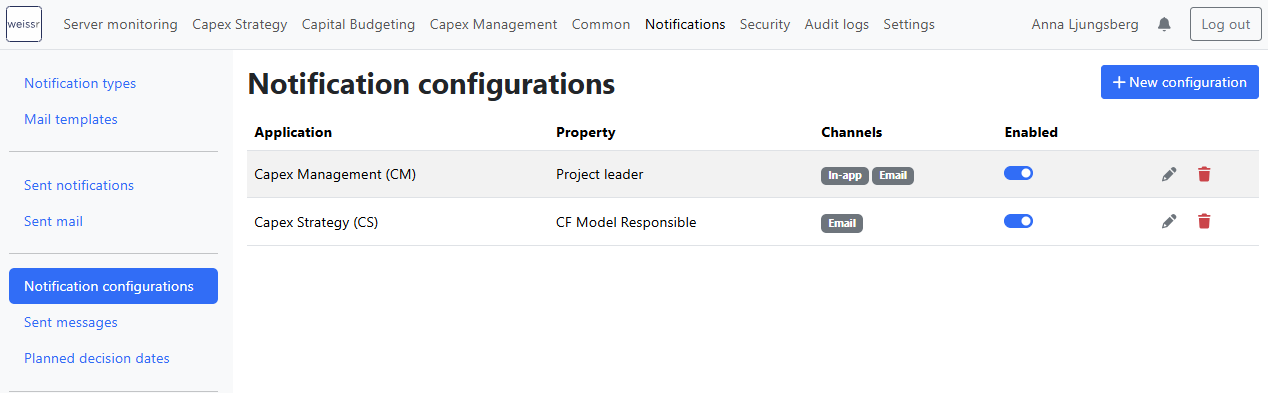
The configuration list shows the application, the triggering property, the channels, and the enabled state for each configuration.
⚠️ Warning: The application cannot be changed after a configuration is created. To notify on a property in the other application, create a new configuration.
Editing, disabling, and deleting a configuration
Edit: you can change the property (within the same application), the content, and the channels at any time.
Disable: the configuration is kept but stops firing. Any messages already queued for it are suppressed, so disabling takes effect immediately rather than after the queue drains.
Delete: the configuration is removed permanently and its queued messages are suppressed.
How do I write notification content?
The body and subject are made of static text plus tags. A tag is a placeholder that is replaced with live data when the notification is sent. The body is required; the subject is optional. To insert a tag, type / in either field and pick from the list that appears. The fields hold tags in their raw {{...}} form, which is the same format the existing tag substitution used elsewhere in Weissr expects.
Which tags are available?
The list of tags is scoped to the configuration's application, so you can only insert tags that will actually resolve. A set of generic tags is shared by both applications.
Tag group | Available in | Resolves to |
|---|---|---|
| Capex Management | Data from the request the property belongs to, such as its ID, name, and planned and actual profitability figures. |
| Capex Strategy | Data from the project and from the alternative that owns the form where the selection was made. |
| Both | The selected user who receives the notification: username, name, surname, and email. |
| Both | The user who made the selection: username, name, surname, and email. |
| Both | System values such as the server URL. |
📌 Note: Tags resolve when the notification is sent, not when the property is saved. This is deliberate: it means recipients see values that reflect the finished state of the entity, including anything that changed during recalculation.
What do the subject and body previews show?
Underneath the Subject and Body fields, the Subject preview and Body preview show your content with each tag replaced by a readable name. For example, {{request.projectSerialNumber}} appears as Request.Project no. and {{notifier.username}} appears as Notifier.Username.
The preview tells you that a tag was recognized and spelled correctly, and it makes a long body easier to read back. It does not resolve values, so use Send test to me when you want to see real data.
Testing a configuration before you enable it
Send test to me delivers the rendered message to you, on the configuration's channels. Generic tags (receiver.*, notifier.*, systemInfo.*) resolve against your own user. Entity tags such as request.name render as placeholder labels, because a test send is not attached to a real request or alternative. A test send never reaches the user selected in the property.
When does a notification fire?
The engine does not send the message from inside the user's save action. When a user is selected into a configured property, the engine queues a pending message in the same transaction as the property change. A dispatcher then sends it once all of the following are true.
The property change is committed.
All recalculations for the affected entity have finished. Completion is observed, not assumed after a fixed wait.
The settle window has passed. This is a short minimum queue age that gives a rapid correction time to resolve.
Re-verification passes: the user is still selected in the property, and the configuration still exists and is still enabled.
If re-verification fails, the message is archived as suppressed and never sent.
This sequence is why a recipient sees a short delay between being selected and receiving the notification. It is what guarantees the content is never stale, and it means a mis-click that is corrected within the settle window does not notify anyone.
When is a notification suppressed or not sent at all?
Situation | What happens |
|---|---|
A user is selected, then removed before dispatch | Nothing is sent. The message is archived as suppressed. |
The same user is re-saved in the property without a change | Nothing is queued. An unchanged save is not an event. |
Rapid re-selections before dispatch | They collapse into one pending message. |
The same user is genuinely re-selected later, after delivery | A new notification is sent. |
The configuration is disabled or deleted while a message is queued | The queued message is suppressed. |
An email send fails | It is retried three times with backoff, then archived as failed. The in-app copy is unaffected. |
What happens on bulk changes and imports?
Bulk operations and imports fire per selection. Each affected user is notified about their own assignment only, so no single person receives a message about everyone else's assignments.
Where do recipients see engine notifications?
Engine notifications appear in the same in-app notification bell as the legacy notifications, with their own read and unread state, and they are pushed live so they arrive without a page refresh. Email notifications use the same mail template wrapper as the legacy notifications.
What happened to the project leader notification?
As a live proof that an existing notification can be expressed as an engine configuration, the legacy Set as project leader of Capex request notification was migrated onto the engine in 5.3.3 as a hard cutover.
An upgrade migration creates one engine configuration per installation, seeded from that installation's existing subject and message templates and its enabled state.
The legacy type no longer appears on the Notification Types page and its legacy trigger has been removed, so the two cannot double-fire.
Content and recipient behavior are unchanged for end users.
📌 Note: The paired no longer project leader of Capex request notification stays on the legacy notification types for now. Only the "set as" side has moved to the engine.
Message archive and retention
Every engine message reaches a terminal state and is recorded in the engine's own archive with that state.
State | Meaning |
|---|---|
Sent | Delivered on the configured channels. |
Suppressed | Deliberately not sent, because re-verification failed at dispatch time. |
Failed | Delivery was attempted and did not succeed after retries. |
The archive is what makes "did this person get notified?" answerable, including for messages that were intentionally not sent.
Archived engine messages are permanently deleted once they pass the retention period, on every channel including in-app. Unread in-app messages are purged too. This is deliberate, not an oversight, and it is a difference from the legacy notifications, which are retained indefinitely.
Deployment settings
Two engine values are set per installation rather than in the admin interface.
Setting | What it controls | Default |
|---|---|---|
Retention period | How long archived messages are kept before they are purged | 90 days |
Settle window | The minimum time a pending message waits before it can be dispatched | Approximately 30 seconds |
Retention is set for the whole installation. It cannot be set per configuration.
What the engine does not cover yet
Version 5.3.3 delivers the first trigger. The following are known gaps rather than defects, and several are planned follow-ups.
Removal from a property does not fire anything. Only selection does.
Conditions on a trigger, such as a specific route, step, status, or property value, are not available.
Other event sources, such as step transitions, status changes, edits, actuals received, or documents added, are not yet available as triggers.
Richer recipients, such as user groups or all users, are not available. The recipient is always the selected user.
Scheduled and reminder notifications are not part of the engine.
Attachments in notification content are not supported.
Capex Strategy property context areas, such as alternative type or summary form applicability, are not used to narrow the trigger. A configuration fires on selection in the property regardless of context area.
Related pages
👉 Managing Notifications, for the legacy notification types, recipients, and sender email configuration