Scope Overview
The Scope represents the highest level of your strategy model hierarchy. It typically maps to the overall business or group level and is the entry point for building your asset structure.
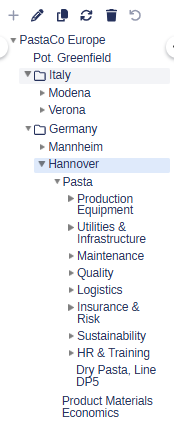
You can structure the scope using a flexible tree that includes Divisions, Sites, and Sub-industries.
Every project has a single Scope node by default. This node cannot be deleted or moved.
What users can do
View and rename the Scope node
Add Divisions, Sites, and Sub-industries under the Scope
Edit location and currency settings for each level
Group assets logically using Middle levels
What users cannot do
Delete or relocate the Scope node
Add cash-flow blocks directly to the Scope (blocks are added at Sub-industry level)
Have a site under multiple divisions at once
Scope structure levels
Level | Description |
|---|---|
Scope | Top-level node (automatically created) |
Division | Business units (e.g. "Europe", "Consumer Goods") |
Middle level | Optional grouping (e.g. “Nordic mills”) |
Site | E.g physical plants, facilities |
Sub-industry | Specific production lines (e.g. pulp, paper etc) |
Use Middle levels to organize large divisions into manageable clusters, without affecting model logic.
How to build the scope structure
Go to the Scope grid
Right-click on the Scope node to add a new Division
Add Sites under each Division
Add Sub-industries under each Site
You can optionally insert Middle levels between Divisions and Sites if needed.
Editing node properties
Click any node to open its detail panel on the right:
Name – display name of the node
Country – used for inflation rate mapping
Currency – determines how data rolls up in reports
Changing a node’s currency will trigger recalculation of all child nodes. Expect a short processing delay.
Best practices
Keep node names short and consistent (e.g., "NL Paper", not "Dutch Paper Mill Line A")
Set currencies and locations early to avoid recalculation
Use color coding for quick visual grouping