Project Settings
Project settings define key behaviors for how the project’s cash flow model functions. These settings include:
The time periods used for modeling capex and financial data
Whether to use custom or global FX and inflation rates
Whether sensitivity analysis is enabled
Period settings
Period settings determine the time structure of the project’s cash flow model. Each period type serves a different purpose in the financial modeling and analysis process.
Historical period
Defines which years will appear as historical years (P1–P2) in the cash flow model. These years are typically used for reference and baseline comparisons.
Start year: First year of historical data (P1)
End year: Last year of historical data (P2)
Forecast period
Defines the forecast window (P3)—this is where you input future assumptions, such as revenues, and costs. It is the key range used in modelling:
The Base Alternative
Strategic Building Blocks
Strategic Alternatives
Trend period
Defines the trend period (P4), typically used for long-term projections. This period continues from the end of the forecast and usually assumes:
A continuation of the last forecast year's assumptions
Application of inflation rates to extend the model
Current year
The current year setting influences how data is displayed and calculated across the project. It serves three key roles:
It defines the year in which the inflation factor is 1, serving as the price base year in the model.
It acts as the cutoff point for hiding historical years when users toggle off historical data in cash flow views.
It determines the first visible year for capex in the Investment Plan view.
The current year is typically set to match the first forecast year, but this alignment is optional.
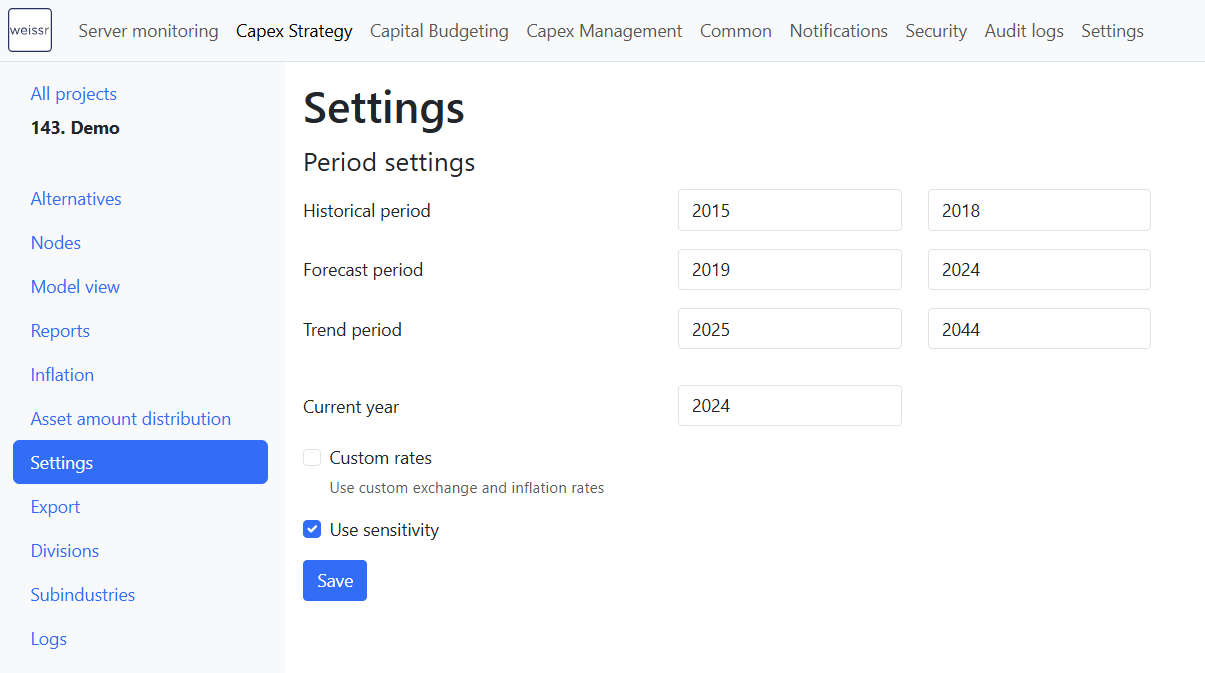
Custom rates
If enabled, the project will use custom-defined inflation and exchange rates rather than global defaults.
Checked:
Inflation rates are defined under the project’s Inflation settings.
FX rates are entered in the project’s Cash Flow Model Assumptions.
Unchecked:
The project uses globally defined inflation and exchange rates.
When duplicating a project, custom rates will be disabled by default, even if they were enabled in the original
For details on updating global FX-rates and country inflation, see the Countries, currencies, and FX-rate documentation.
Use sensitivity
Enable this option to activate:
The Sensitivity Summary report
The Ad-hoc Sensitivity feature in Strategic Alternatives
Sensitivity analysis can be performance-intensive. Only enable this setting if sensitivity outputs are required, as it may slow down calculation times and report generation.