Audit logs
The Audit logs section in Administration → Audit logs records changes to administrative settings in Weissr Capex, so you can see who made a change, when it was made, and what the value was before and after. The section holds four separate logs: Common settings, Exchange rates, Period management, and Security / Permissions. This page explains what each log records and how to read it. It is written for administrators.
What the audit logs are for
The audit logs answer four kinds of question:
Compliance. Evidence that administrative changes are recorded and attributable, for internal control frameworks and external audits.
Security. A record of sign-ins, failed sign-ins, permission grants and group membership changes.
Troubleshooting. A history of configuration changes, which is usually the fastest way to explain when something changed and why.
Accountability. A per-user trail of administrative activity.
📌 Note: The audit logs cover administrative settings only. Changes to business data such as requests, expenditures and assets are recorded separately, in the Log tab inside each request and in the Capex Strategy node and model input logs. 👉 Learn more about request logs
Where the audit logs live
Open Administration → Audit logs. The page has a left sidebar with the four logs, and it opens on Common settings.
Log | Path | What it covers |
|---|---|---|
Common settings |
| Changes to system-wide settings on the Common settings admin page |
Exchange rates |
| Changes to exchange rate values |
Period management |
| Creation, update and deletion of Capex Management period groups |
Security / Permissions |
| Authentication, authorization, users, user groups and permissions |
All four logs are read-only, sorted newest first, and paginated. You choose 10, 25, 50, 100 or 200 entries per page, and the default is 10.
Common settings
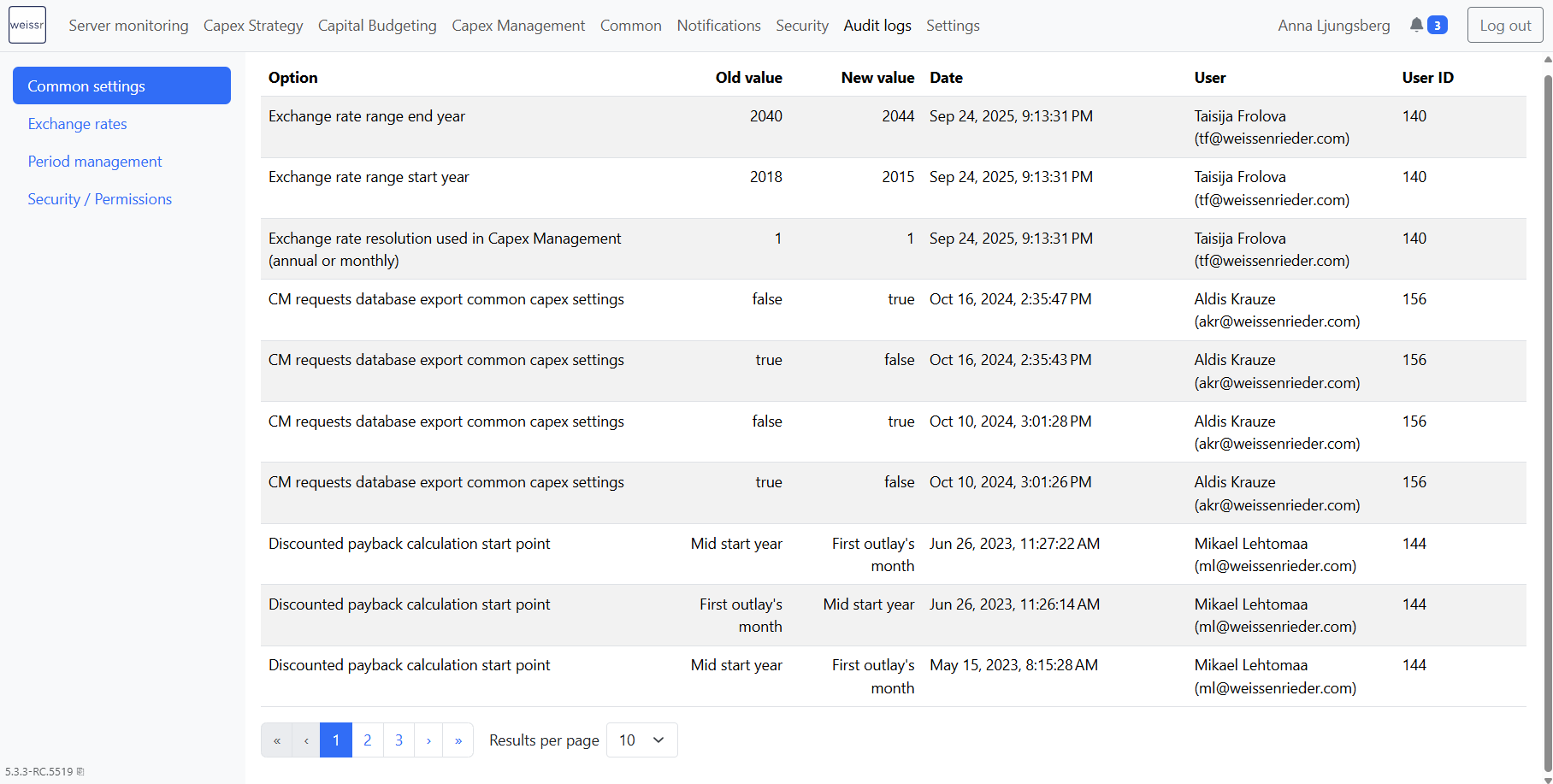
The Common settings log records changes to system-wide settings made on the Common settings administration page.
What the table shows
Column | Contents |
|---|---|
Option | The name of the setting that was changed |
Old value | The value before the change |
New value | The value after the change |
Date | When the change was made |
User | The name of the user who made the change |
User ID | The Weissr ID of that user |
Which settings are recorded
Exchange rate resolution used in Capex Management, annual or monthly
Exchange rate range start year
Exchange rate range end year
Discounted payback calculation start point
Depreciation calculation by year or month
Depreciation salvage money property
Maximum number of request import attempt logs visible to a user
Maximum number of asset import attempt logs visible to a user
Ad hoc notification retention days
The Capex Management report data export settings: schedule, filter, capex, cash flow schedule, cash flow filter and budget schedule
📌 Note: An entry is created when an existing setting changes, so the very first time a setting is given a value there is no previous value and no entry. Discounted payback calculation and depreciation calculation are shown with their descriptive text. Every other setting is shown exactly as it is stored.
Exchange rates
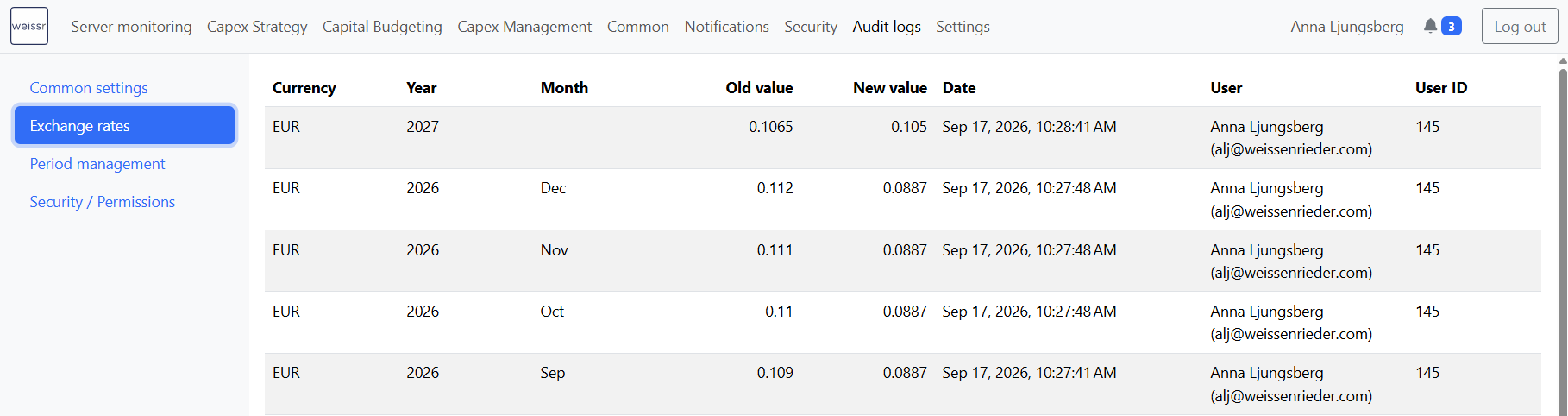
The Exchange rates log records changes to exchange rate values. It covers the numbers, not the currencies themselves.
What the table shows
Column | Contents |
|---|---|
Currency | The ISO code of the currency whose rate changed |
Year | The year the rate applies to |
Month | The month the rate applies to |
Old value | The rate before the change |
New value | The rate after the change |
Date | When the change was made |
User | The name of the user who made the change |
User ID | The Weissr ID of that user |
What is recorded
Setting or changing a monthly rate. One entry per changed value, with the year and month it applies to.
Clearing a monthly rate. Recorded in the same way, with an empty new value.
Setting an annual, or average, rate. Recorded as a single entry for the year.
📌 Note: An annual rate change produces one entry with the Month column empty, because the change applies to the whole year rather than to a single month. The twelve monthly values that the annual rate writes behind the scenes are deliberately not recorded separately, which keeps one action to one line in the log.
Period management
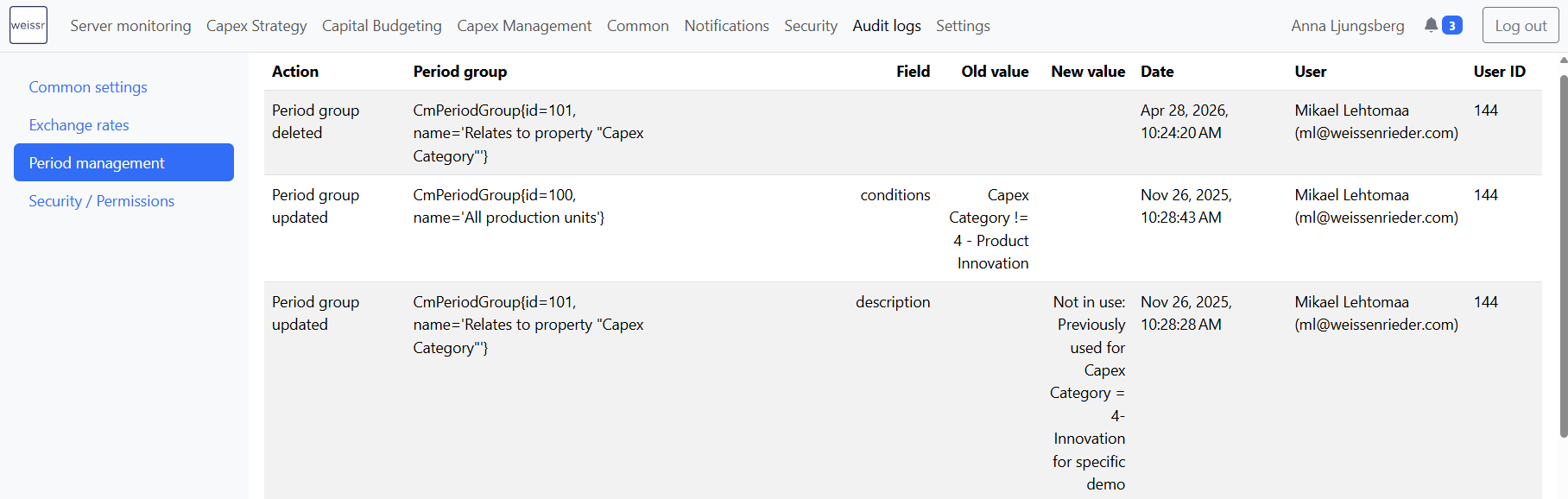
The Period management log records changes to Capex Management period groups, which is where the period closing schedule and its criteria are configured.
What the table shows
Column | Contents |
|---|---|
Action | Period group created, updated or deleted |
Period group | The period group that was affected |
Field | The parameter that was changed |
Old value | The value before the change |
New value | The value after the change |
Date | When the change was made |
User | The name of the user who made the change |
User ID | The Weissr ID of that user |
What is recorded
Period group created, and who created it.
Period group deleted, and who deleted it.
Name and description changes.
Scheduling changes, meaning edits to how and when periods close.
Criteria and configuration changes, including accrual and cash balancing adjustments, forecast delta adjustment behaviour, forecast delta adjustment on a separate expenditure line item, default properties for the expenditure forecast line, closing behaviour, and period group conditions.
💡 Info: Period group conditions and default properties are each recorded as a single field rather than one entry per condition. An edit inside a condition therefore shows as a change to the conditions as a whole, with the previous and new state in the value columns.
👉 Learn more about Period management
Security and permissions
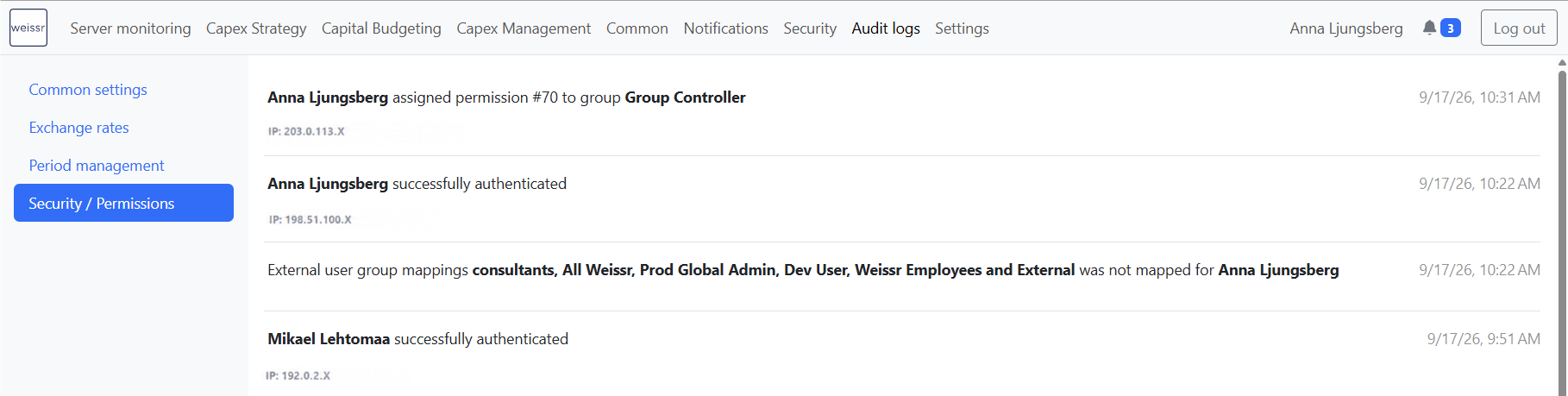
The Security / Permissions log records authentication, authorization, and every change to users, user groups and permissions. It is the log to reach for in a security review.
Unlike the other three, this log is not a table. Each entry is a sentence describing what happened, with the timestamp on the right. Failed authentication and failed authorization entries are shown in red and carry the exception detail and the requested address. Entries also carry the IP address and the session ID where those are known.
What is recorded
Area | Recorded events |
|---|---|
Sign-in | Successful sign-in, failed sign-in, failed sign-in attempt, user switch, expired password, password changed, forgotten password requested, forgotten password requested by SMS, SMS code requested, invalid verification code |
Authorization | Authorization failure, meaning a signed-in user tried to reach something they do not have permission for |
Users and user groups | User or group created, deleted, enabled or disabled, username changed, email changed, group name changed, user licence changed |
Permissions and membership | Permission assigned to a group, permission removed from a group, user assigned to a group, user removed from a group |
Identity provider | External group mapping changed, unmapped identity provider groups seen at sign-in, group claim field not found |
💡 Info: The unmapped identity provider groups entry is the one to look at when an SSO user signs in with fewer permissions than expected. It lists the groups the identity provider sent that have no mapping in Weissr.
📌 Note: Signing out and session expiry are not recorded, only the sign-in side. If you need to know when a user's session ended, that information is not available in Weissr.
👉 Learn more about Permissions
What the audit logs do not do
A few limits are worth knowing before you go looking for something.
No search, filter or date range. You page back through the entries in date order. To reach an older change faster, set the page size to 200 first.
No sorting. The order is always newest first.
No export. The logs cannot be exported to a file from the application. If you need an extract for an audit, contact Weissr support.
Entries are kept indefinitely. Nothing deletes them and there is no retention setting, so the full history stays available.
English only. The audit log labels are not translated, even when the rest of the application runs in another language.
Access
Administration → Audit logs is available to users holding either the Administrator permission or the Capex Management configuration permission. The Security / Permissions log additionally requires the Administrator permission.
Common questions
Question | Answer |
|---|---|
I changed a setting, why is there no entry? | Each section above lists exactly what that log records. An entry is also only created when an existing value changes, not when a setting is given its first value. |
Why is the Month column empty on an exchange rate entry? | The change was an annual, or average, rate, so it applies to the whole year rather than to a single month. |
Can I export the audit log? | Not from the application. Contact Weissr support if you need an extract for an audit. |
How long are entries kept? | Indefinitely. Nothing deletes them and there is no retention setting. |
Can I search for a specific change? | There is no search or filter. Set the page size to 200 and page back through the entries, which are ordered newest first. |
Why can I not open the Security / Permissions log? | That log requires the Administrator permission. The Capex Management configuration permission reaches the other three. |