Calculated Expenditure Fields
An expenditure property can calculate its own value from an expression, so metrics that used to be exported to Excel are computed in Weissr on every expenditure. A superuser creates the property, marks it calculated, and writes an expression; the property then appears read-only in the expenditure grid, with each line showing its own computed value. This guide covers how to set one up, what triggers a recalculation, and how an expression on an expenditure reaches values on the parent capex request.
What is a calculated expenditure field? NEW IN 5.3.5
A calculated expenditure field is an expenditure-applicable property whose value comes from an expression instead of from user input. An expenditure is technically a request of its own, so expressions work exactly as they do on the capex request level, one level lower. The same function library applies, and each expenditure is calculated separately, so two expenditures on the same request can show different values from the same expression.
📌 Note: The expenditure grid and the release notes call these fields. The administration interface calls them properties. They are the same thing.
How do you create a calculated expenditure field?
Location: Administration → Capex Management → Properties → List
Click + New property in the upper right corner.
Enter the Name and Code.
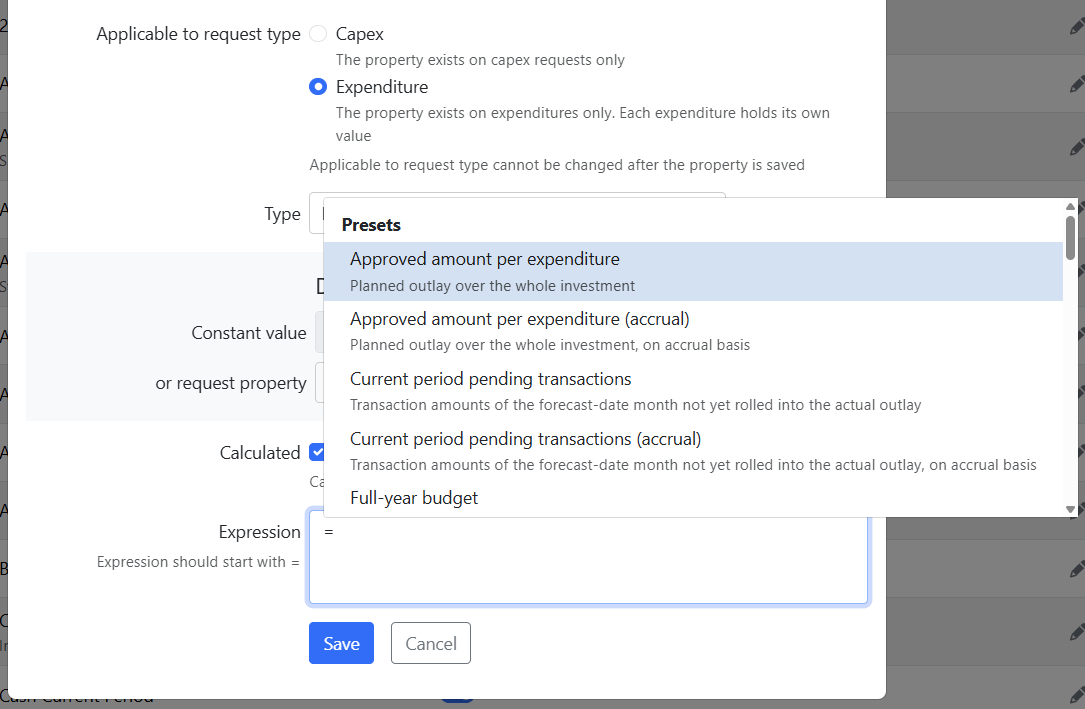
Set Applicable to request type to Expenditure.
Choose the Type.
Tick Calculated, labelled The value is calculated and read only.
Under Way of calculating, select Expression.
Type your expression in the Expression field, starting with
=. Typing suggests the available functions and outlay presets, each with a plain-language description.Click Save.
Set Applicable to request type and Calculated before you save. Both are locked once the property exists, so a property created as Capex cannot later be moved to Expenditure, and a property created as editable cannot later become calculated.
⚠️ Warning: Applicable to request type and the Calculated flag cannot be changed after the property is saved, in either direction. Plan both before you create the property. The interface greys the locked settings out, and the API rejects a change attempt with a validation error.
👉 Learn about the outlay functions and their presets, which is where the actuals, forecast and budget figures for an expenditure come from.
Which property types can carry an expression?
Any expenditure property type can carry an expression, chosen at the creator's discretion. The earlier restriction to money and decimal types no longer applies. The exception is static system properties, which have their own way of calculating their value and never offer an expression field.
What stays editable after creation
The settings that define how the property works are locked, but everything inside those choices stays editable:
The expression itself, with values recalculated from the updated expression
Codes on a code property, and the default value
The aggregation rule on a money property
Name, description, ordering and the Can be used as filter flag
📌 Note: Deleting the expression keeps the last calculated values. Values are recalculated only when the expression changes or another way of calculating is chosen. A property does not become editable again by having its expression removed.
Only one way of calculating at a time
While Receives value from model is on, no expression can be entered, and while an expression is present, the property cannot receive its value from a model. Choose one.
When do calculated expenditure values recalculate?
The triggers are the same as on the capex request level:
Saving the expenditure
Changes to the expenditure's own data, including its outlay values
A change to a referenced value on the parent capex request, for expressions that read one
The administrator recalculate action, run manually
A change recomputes only the values whose inputs it touched, in dependency order. When one calculated property feeds another, Weissr calculates the input property first, using the dependency graph that already orders calculated properties on the request level.
💡 Info: An expenditure where the expression cannot compute shows blank rather than an error.
How to recalculate all expenditure values manually
Administrators can trigger a recalculation of the calculated values on all expenditure requests. The action runs one capex request at a time, through the same scoped path as the automatic triggers, so it does not clear and rebuild values in bulk. The trigger is unfiltered in this version, meaning it covers every capex request rather than a selected subset.
How does an expression on an expenditure read values from the parent capex request?
There is no new function and no new syntax for this. GetProperty, and every other function that takes a property as input, resolves a reference according to the referenced property's applicability relative to where the expression runs.
Expression runs on | Referenced property is | Resolves to |
|---|---|---|
An expenditure | Capex-applicable | The parent capex request's value |
An expenditure | Global | The expenditure's own value |
An expenditure | Expenditure-applicable | The expenditure's own value |
A capex request | Expenditure-applicable | Empty |
Global properties are never inherited. On an expenditure, a global property means that expenditure's own value, which is why a global property gives you nothing that Capex applicability does not when the value belongs to the request as a whole.
Calculated capex request properties can be referenced too. An expenditure expression that reads one recalculates after that property, and when the parent value changes every expenditure expression that references it recalculates.
📌 Note: When the parent capex request has no value for the referenced property, the reference is empty, and the expression handles it like any other empty input. Guard it with
IfEmptyorIsEmptywhere an empty input would produce a misleading result.
Example: fall back to the request's cost centre
Expenditures can carry their own cost centre, but most do not. This expression on an expenditure property shows the expenditure's own cost centre where one has been entered, and the parent request's cost centre otherwise, so the column is filled in everywhere:
=IfEmpty(GetProperty("line_cost_center"); GetProperty("cost_center"))
line_cost_center is an expenditure-applicable property, so it resolves to the expenditure's own value. cost_center is capex-applicable, so it resolves to the parent request's value. Neither reference needs any special syntax; the applicability decides which level is read.
⚠️ Warning: Aggregating expenditure values upward to the capex request is not available. An expression on a capex request resolves an expenditure-applicable property to empty. To show a total from the expenditures on the request, use the Expenditure aggregation setting on a money property instead.
When is a value blank, and when is it zero?
The distinction is deliberate, and it tells you whether the calculation ran:
Zero means the calculation applied but its window summed nothing, either because there are no matching rows or because the rows sum to zero.
Blank means the calculation does not apply to that expenditure at all. An actual-outlay function on an expenditure still in pre-decision is blank, as is a delta row with no approved amount, or a transactions function on an expenditure with no external ID.
Weissr does not calculate where the inputs are invalid. Which properties appear in which layout stays the administrator's choice.
What is not supported in this version
Importing values into a calculated field. Custom expenditure property values are not importable at all yet, so there is nothing to import into a calculated field. A value sent anyway is rejected with a warning-level error rather than written.
Outlay functions in capex request expressions. The outlay functions are parsed on expenditures only. Existing expressions on capex and global properties keep working unchanged.
Multiple currencies. All calculated expenditure values are held in the request currency.
A visual expression builder. The expression field is plain text with autocomplete. Syntax highlighting and inline validation are later phases.
Related pages
Outlay Functions: the actuals, forecast and budget presets available to expenditure expressions.
Expressions in Properties and Investment Models: how expressions work on capex requests, and the syntax rules that apply everywhere.
Property Expression Functions: the full function library with worked examples.
Creating and Managing Properties: the other settings on a property, including access restrictions.
Expenditures: how the expenditure grid works.